Auphonic CLI
The Auphonic CLI is a command-line tool for audio processing and podcast production using the Auphonic API. It covers the full production lifecycle — from creating and processing productions to downloading results and publishing to external services — all from your terminal.
Download the latest version from the Auphonic CLI download page.
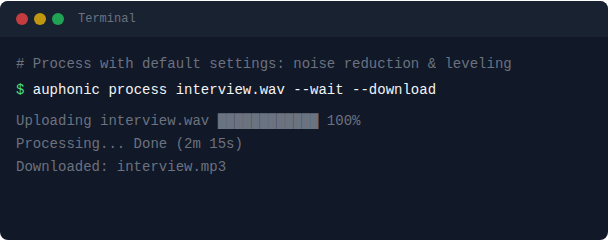
What can it do?
Process audio files with a single command
Use presets for repeatable settings
Publish to external services (SoundCloud, YouTube, Dropbox, …)
Multitrack productions with per-track processing
Speech recognition and transcript generation
Scriptable with JSON output, quiet mode, and exit codes
Tip
Use auphonic --help and auphonic <command> --help to see all available
commands, flags, and options directly in your terminal.
Quick Start
# Authenticate (opens browser, prompts for API key, validates)
auphonic auth login

# Process an audio file (default output: mp3)
auphonic process episode.wav --wait --download

# Check your account
auphonic user
Authentication
The CLI resolves the API key in this order:
--api-keyflagAUPHONIC_API_KEYenvironment variableSaved config file (
~/.auphonic/config.json)
See API Key Authentication for how to find your API key.
# Interactive login (opens browser to API key page, prompts, validates)
auphonic auth login

# Or set directly
auphonic auth set YOUR_API_KEY

# Or provide via environment
export AUPHONIC_API_KEY=YOUR_API_KEY

# Or pass per-command
auphonic user --api-key YOUR_API_KEY

# View saved key (masked)
auphonic auth show

# Remove saved key
auphonic auth logout
Usage Examples
Common Workflows
Simple Processing
The process, create, and preset create commands add a default mp3 output, enable
denoise (dynamic mode) and AutoEQ filtering automatically for singletrack when no
--output, --preset, or --from-json is specified. The update and preset update
commands do not inject defaults — only explicitly provided flags are sent, preserving existing
configuration.
auphonic process episode.wav --wait --download
Process and Open in Browser
Process an audio file and open the production page in your browser when done.
auphonic process episode.wav --wait --open
With Metadata and Multiple Outputs
Set metadata like title and artist, and produce multiple output formats at once.
auphonic process episode.wav \
  --title "Episode 42 - Interview" \
  --artist "My Podcast" \
  --output format=mp3,bitrate=128,suffix=-main \
  --output format=wav,filename=out.wav \
  --wait --download
Using a Preset
The --preset flag accepts a preset UUID or name (see presets).
If multiple presets share the same name, the most recently created personal preset takes priority
over shared presets and Auphonic presets.
auphonic process episode.wav \
  --preset "My Podcast" \
  --title "Episode 42" \
  --wait
Remote Input (URL)
Process an audio file directly from a URL without downloading it first.
auphonic process https://example.com/episode.wav --wait
External Service Input
Process a file stored on an external service like Dropbox or Google Drive.
auphonic process episode.wav \
  --service DROPBOX_UUID \
  --wait
Listing Productions with Sort and Filter
List your productions with sorting and filtering options.
auphonic list --sort name --filter done
auphonic list --sort status --filter error
auphonic list --limit 50 --sort date
Advanced Usage
Piping from stdin
Use - as input to read audio from stdin. This makes the CLI composable with tools
like curl, ffmpeg, and sox:
# Pipe from curl
curl -s https://example.com/audio.wav | auphonic process - --wait

# Pipe from ffmpeg (extract audio from video)
ffmpeg -i video.mp4 -f wav - | auphonic process - --input-format wav --wait

# Pipe from sox (convert sample rate before processing)
sox input.wav -r 48000 -t wav - | auphonic process - --wait
Use --input-format to specify the audio format when piping (default: wav).
Intro and Outro
Add intro and outro audio with configurable crossfade overlap.
auphonic process episode.wav \
  --intro file=intro.wav,offset=2.5 \
  --outro file=outro.wav,offset=3.0 \
  --wait
Chapter Markers
Add chapter markers with timestamps, titles, URLs, and images.
# Shortcut syntax: SECONDS=TITLE
auphonic process episode.wav \
  --chapter 0=Intro \
  --chapter 68.5=Interview \
  --chapter 180.3="Q&A Session" \
  --wait

# Structured syntax with URL and image
auphonic process episode.wav \
  --chapter "start=0,title=Intro" \
  --chapter "start=68.5,title=Interview,url=https://example.com" \
  --chapter "start=180.3,title=Q&A,image=https://example.com/qa.jpg" \
  --wait

# From a chapters file (one chapter per line: TIMESTAMP TITLE <optional_url>)
auphonic process episode.wav \
  --chapters-file chapters.txt \
  --wait
Example chapters file (chapters.txt):
# Lines starting with # are ignored
00:00:00.000 Intro
00:01:08.500 Interview <https://example.com/interview>
00:03:00.300 Q&A Session
Publishing to External Services
Publish output files to external services like SoundCloud or SFTP, with per-service settings.
auphonic process episode.wav \
  --output format=mp3,bitrate=128,outgoing_services=SOUNDCLOUD_UUID \
  --publish uuid=SOUNDCLOUD_UUID,sharing=private,downloadable=false \
  --publish SFTP_UUID \
  --wait
Multitrack Production
Combine multiple audio tracks (e.g. host, guest, music) with per-track processing and panning. See multitrack productions for details.
auphonic process \
  --track id=host,file=host.wav,filtering=true,denoise=true,denoisemethod=dynamic,denoiseamount=10,pan=L10 \
  --track id=guest,file=guest.wav,filtering=true,denoise=true,denoisemethod=dynamic,denoiseamount=12,pan=R10 \
  --track id=music,file=music.wav,gain=-4,backgroundgain=-18,pan=C \
  --wait
Multitrack from Preset
Create a multitrack production from a preset, upload local files to each track, and start processing.
# Create production from a multitrack preset (tracks are defined in the preset)
# --quiet prints only the production UUID, which is captured in the $UUID variable
UUID=$(auphonic create \
  --preset "My Multitrack Preset" \
  --title "Multitrack Production" \
  --quiet)

# Upload local audio files to individual tracks
auphonic track update "$UUID" "Track 1" --track file=/full/path/to/MIC1.WAV
auphonic track update "$UUID" "Track 2" --track file=/full/path/to/MIC2.WAV

# Start processing
auphonic start "$UUID"
Multitrack with Loop / Trim
Use Loop / Trim to automatically lengthen or shorten a track to
match the length of the longest track that does not have loop_trim enabled.
This is useful for short music beds, intro jingles, or ambient loops that should play
underneath the whole production. Set loop_trim=true on the track(s) that should be
resized:
auphonic process \
  --track id=host,file=host.wav \
  --track id=guest,file=guest.wav \
  --track id=music,file=short-loop.wav,backforeground=background,backgroundgain=-18,loop_trim=true \
  --wait
You can also toggle loop_trim on an existing track:
auphonic track update "$UUID" music --track loop_trim=true
If every track has loop_trim=true, the longest track is used as the reference.
Speech Recognition with Transcript Output
Enable speech recognition and download subtitles or transcripts.
auphonic process episode.wav \
  --speech-language en \
  --keyword Auphonic \
  --output format=subtitle,ending=srt \
  --output format=transcript,ending=html \
  --wait --download
Burn-In Subtitles
Render the transcript directly into a video output file. Requires
speech recognition and a video output.
Any subtitle_* styling key auto-enables burn-in.
auphonic process episode.mp4 \
  --speech-recognition \
  --output "format=video,subtitles=on,subtitle_font=anton,subtitle_font_size=30,subtitle_style_mode=color_outline,subtitle_word_highlight=highlight" \
  --wait --download
See Burn-In Subtitle Keys for all styling keys and their values.
Algorithm Tuning
Fine-tune individual audio processing algorithms like loudness, noise reduction, and silence cutting.
auphonic process episode.wav \
  --loudness -16 \
  --denoise --denoise-method dynamic --denoise-amount 12 \
  --deverb-amount 6 \
  --silence-cutter \
  --wait
Denoise Segments
Apply different noise reduction methods to specific time segments of your audio.
auphonic process episode.wav \
  --segment "start=0,stop=20,denoisemethod=music" \
  --segment "start=20,stop=40,denoisemethod=speech,denoiseamount=6" \
  --wait
For multitrack per-track segments, use --from-json with the full JSON structure:
echo '{"multi_input_files": [
  {"id": "host", "algorithms": {"segments": [
    {"start": 0, "stop": 20, "denoisemethod": "music"},
    {"start": 20, "stop": 40, "denoisemethod": "speech"}
  ]}}
]}' | auphonic update UUID --from-json -
Scripting and Automation
Start with Wait and Download
Control each step of the production lifecycle individually.
# Start and wait for completion
auphonic start UUID --wait --download

# Check status and wait
auphonic status UUID --wait

# Publish and wait for completion
auphonic publish UUID --wait
From JSON Config
# From a file
auphonic process --from-json production.json --wait --download

# From stdin
cat config.json | auphonic process --from-json - --wait

# JSON base with CLI overrides
auphonic process --from-json base.json --title "Override Title" --output mp3
Example production config (production.json):
{
  "metadata": {
    "title": "Episode 42 - Interview",
    "artist": "My Podcast",
    "album": "My Podcast"
  },
  "output_files": [
    {"format": "mp3", "bitrate": 128},
    {"format": "aac", "bitrate": 128}
  ],
  "algorithms": {
    "denoise": true,
    "denoisemethod": "dynamic",
    "loudnesstarget": -16
  }
}
Dry Run (Preview without API Calls)
Preview the JSON request body that would be sent to the API, without making any API calls.
auphonic process episode.wav --loudness -16 --dry-run
auphonic preset create --name "Test" --dry-run
Quiet Mode and Shell Variables
Use --quiet mode and shell variables for scripting workflows.
# Create, then manage steps individually
UUID=$(auphonic create episode.wav --quiet)
auphonic start "$UUID"
auphonic wait "$UUID" --wait-timeout 300
auphonic download "$UUID" --dir ./output

# List all production UUIDs
auphonic list --uuids-only

# JSON output for programmatic parsing
auphonic get "$UUID" --json | jq '.metadata.title'
Preset Management
Create reusable presets from the command line and use them in productions.
# Create a reusable preset
auphonic preset create \
  --name "Podcast Default" \
  --output format=mp3,bitrate=128 \
  --loudness -16 \
  --denoise

# Use the preset (by UUID or name)
auphonic process episode.wav --preset PRESET_UUID --wait
Commands
Production Lifecycle
Command |
Description |
|---|---|
|
Create a production and start processing immediately |
|
Create a production without starting |
|
Update an existing production |
|
List productions |
|
Retrieve production details |
|
Start an existing production |
|
Stop a currently processing production |
|
Wait until processing finishes |
|
Show processing status |
|
Download output files (per-UUID subdirs for multiple) |
|
Trigger outgoing services |
|
Delete productions (confirms interactively or via |
Presets
Command |
Description |
|---|---|
|
List presets |
|
Retrieve preset details |
|
Create a new preset (requires |
|
Update an existing preset |
|
Delete presets (confirms interactively or via |
|
Open preset edit page in browser |
|
Open preset edit page in browser |
Other Commands
Command |
Description |
|---|---|
|
List all connected external services |
|
List files/folders on an external service |
|
List available algorithms and parameters |
|
List available output formats and bitrates |
|
List available external service types |
|
List production status codes |
|
Show webhook URL(s) for a production |
|
Add a webhook URL to a production |
|
Remove all webhooks from a production |
|
List tracks in a multitrack production |
|
Add a track to a production |
|
Update a specific track |
|
Remove a specific track |
|
Remove all tracks |
|
Set a config value |
|
Get a config value |
|
List all config values |
|
Show current user info |
|
Alias for |
|
Open production page or dashboard in browser |
|
Print CLI version |
|
Generate shell completion (bash/zsh/fish/powershell) |
Available config keys: api-key, base-url, default-preset, download-dir
When default-preset is set (UUID or preset name), process/create will use it if --preset is not explicitly provided.
When download-dir is set, download commands will use it if --dir is not provided.
Global Flags
Flag |
Description |
|---|---|
|
API key (overrides config and env var) |
|
API base URL (default: |
|
Output raw JSON data to stdout |
|
Output format: |
|
Only print the UUID (or relevant ID) |
|
Disable colored output |
|
Print HTTP request/response details to stderr |
|
Config file path (default: |
Command-Specific Flags
Flag |
Description |
|---|---|
|
Print JSON body without making API calls (process/create/update/preset create/update) |
|
Show detailed status during |
|
Wait until processing finishes (process/create/start/stop/publish/status) |
|
Download output files after processing (process/create/start) |
|
Open production in browser after creation (process/create) |
|
Audio format when reading from stdin, e.g. wav, mp3, flac (default: wav) |
|
Confirm deletion without prompting (delete/preset delete) |
Structured Flag Syntax
Several flags accept structured key=value,key=value,... input.
If no = is present, the value is treated as a shortcut for the default key.
--output
See output files for all available formats and options.
--output mp3                              # shortcut for format=mp3
--output format=mp3,bitrate=128,suffix=-web
--output format=wav,mono_mixdown=true
--output format=aac,ending=m4a            # override file extension
--output format=mp3,outgoing_services=UUID1,UUID2
--output format=subtitle,ending=srt       # speech recognition subtitles
Key |
Type |
Description |
|---|---|---|
|
string |
mp3, mp3-vbr, aac (M4A/MP4), vorbis (OGG), opus, flac, alac, wav, wav-24bit, video, audiogram, input (original), tracks (multitrack zip), speech (json/xml), subtitle (srt/webvtt), transcript (html/txt) |
|
int |
Bitrate in kbps (for lossy formats) |
|
bool |
Create mono mixdown |
|
bool |
Split output file on chapter marks |
|
string |
Suffix before extension (e.g. |
|
string |
File extension override (e.g. |
|
string |
Full filename override (takes priority over suffix/ending) |
|
string |
Comma-separated UUIDs of services to send this file to |
Burn-In Subtitle Keys (--output)
On a video output, additional subtitle_* keys burn the transcript into the
video (requires speech recognition). Any styling key
auto-enables burn-in; subtitles=false overrides. See
burn-in subtitles for details on each option.
--output format=video,subtitles=on
--output "format=video,subtitle_font=anton,subtitle_font_size=30,subtitle_style_mode=color_outline"
--output "format=video,subtitle_word_highlight=highlight,subtitle_highlight_color=#dc2626"
Key |
Type |
Description |
|---|---|---|
|
bool |
Enable/disable burn-in (default off; auto-enabled by any styling key below) |
|
string |
Font slug: |
|
int |
Font size, 8–200 (default 22) |
|
bool |
Bold text (default off) |
|
bool |
Italic text (default off) |
|
bool |
Underline text (default off) |
|
bool |
Render all text in UPPERCASE (default off) |
|
string |
Base text/accent color as |
|
string |
Active-word color as |
|
string |
|
|
string |
Horizontal position: |
|
string |
Vertical position: |
|
string |
Per-word effect: |
--publish
See external services for available service types and their settings.
--publish SOUNDCLOUD_UUID                 # shortcut for uuid=...
--publish uuid=SC_UUID,sharing=private,downloadable=false
--publish uuid=YT_UUID,privacy=public,category=22
--publish uuid=FB_UUID,distribution=everywhere
Key |
Type |
Services |
Description |
|---|---|---|---|
|
string |
all |
Required. External service UUID (from |
|
string |
SoundCloud, Spreaker |
|
|
bool |
SoundCloud, Spreaker |
Allow downloads |
|
string |
SoundCloud |
SoundCloud track type |
|
string |
YouTube |
|
|
string |
YouTube |
Video category |
|
bool |
Captivate, PodBean |
Save as draft |
|
string |
|
|
|
bool |
Allow embedding |
|
|
string |
Captivate, PodBean |
Episode type (Captivate: |
|
string |
Spreaker |
Show name |
|
string |
RSS.com |
Podcast identifier |
--track
See multitrack productions for details on track configuration.
# Basic multitrack with two speakers
--track id=host,file=host.wav
--track id=guest,file=guest.wav

# With per-track audio processing
--track id=host,file=host.wav,denoise=true,denoisemethod=dynamic,denoiseamount=12,pan=L10
--track id=music,file=music.wav,backforeground=background,backgroundgain=-18

# File from external service
--track id=host,service=DROPBOX_UUID,file=/recordings/host.wav
Keys: id (required label), file/input_file (local path or URL),
service (external service UUID), offset (seconds, when track starts; 0 = aligned with first track).
Per-track algorithm keys: see Per-Track Algorithms below.
--intro / --outro / --insert
# Intro: played before main audio, with overlap
--intro intro.wav                         # shortcut for file=intro.wav
--intro file=intro.wav,offset=2.5         # 2.5s overlap with main audio

# Outro: played after main audio, with overlap
--outro file=outro.wav,offset=3.0         # 3.0s overlap with main audio

# Insert: placed at a specific position in main audio
--insert file=jingle.wav,offset=120.5     # insert at 120.5s

# File from external service
--outro service=DROPBOX_UUID,file=/audio/outro.wav
Key |
Type |
Description |
|---|---|---|
|
string |
Local file path or URL |
|
string |
External service UUID for the file |
|
float |
Intro: overlap with next audio in seconds. Outro: overlap with previous audio in seconds. Insert: position in main audio in seconds. |
|
string |
Identifier (used as form field name for uploads) |
--chapter
--chapter 12.5=Intro                      # shortcut: SECONDS=TITLE
--chapter "start=30.0,title=Main Topic"   # structured syntax
--chapter "start=90,title=Links,url=https://example.com,image=https://example.com/img.jpg"
Supported keys: start (seconds, converted to HH:MM:SS.mmm), title, url, image.
--chapters-file
--chapters-file chapters.txt              # local file
--chapters-file https://example.com/chapters.txt  # URL (passed to API directly)
File format (one chapter per line):
HH:MM:SS.mmm Title <optional_url>
Lines starting with # and empty lines are ignored.
Timestamps can also be plain seconds (e.g. 68.5).
--segment
--segment "start=0,stop=20,denoisemethod=music,denoiseamount=12"
--segment "start=20,stop=60,denoisemethod=speech,deverbamount=6"
--segment "start=60,stop=90,denoisemethod=off"
Segments must be contiguous: each segment’s start must equal the previous segment’s stop
(no gaps or overlaps). Requires --denoise.
Key |
Type |
Description |
|---|---|---|
|
float |
Required. Segment start time in seconds |
|
float |
Required. Segment end time in seconds |
|
string |
|
|
int |
0=full/auto, -1=off, 3,6,9,12,15,18,24,30,36,100 |
|
int |
0=full, -1=off, 3,6,9,12,15,18,24,30,36,100 (speech/music only) |
|
int |
-1=off, 3,6,9,12,15,18,24,30,36,100 (speech only) |
|
string |
|
For multitrack per-track segments, use --from-json with the full JSON structure.
--cut
Remove audio regions. Times are in seconds, format is START:END. Repeatable for multiple cuts.
--cut 10.5:30.2                           # remove audio from 10.5s to 30.2s
--cut 0:5.0 --cut 120:125                 # remove two regions
Algorithm Flags
See singletrack algorithms and multitrack algorithms for detailed descriptions of each algorithm.
Boolean algorithm flags like --leveler, --filtering, --denoise are enabled by default
on the server. Use --flag=false to explicitly disable them (e.g. --leveler=false).
The CLI enables --denoise, --denoise-method=dynamic, and --filter-method=autoeq
by default for singletrack process, create, and preset create commands.
Use --denoise=false or --filter-method=hipfilter to override.
Singletrack Algorithms
Filtering and Leveling
See adaptive leveler and adaptive filtering for details.
Flag |
Description |
Values |
Default |
|---|---|---|---|
|
Adaptive filtering |
boolean |
on |
|
Filter method |
hipfilter, autoeq, bwe, studiovoice |
autoeq (CLI) |
|
Adaptive leveler |
boolean |
on |
|
Leveler strength (sets both speech/music) |
0,10,20,30,40,50,60,70,80,90,100,110,120 |
100 |
|
Leveler strength for speech |
0,10,20,30,40,50,60,70,80,90,100,110,120 |
|
|
Leveler strength for music |
-1 (same as speech),0,10,20,…,90,100 |
|
|
Compressor (sets both speech/music) |
auto, soft, medium, hard, off |
auto |
|
Compressor for speech |
auto, soft, medium, hard, off |
auto |
|
Compressor for music |
same, auto, soft, medium, hard, off |
|
|
Gain for music segments (dB) |
-6,-5,-4,-3,-2,0,2,3,4,5,6 |
0 |
|
Music/speech classifier |
on (auto-detect), speech, music |
on |
Loudness Normalization
See loudness normalization for details.
Flag |
Description |
Values |
Default |
|---|---|---|---|
|
Enable loudness normalization |
boolean |
on |
|
Target loudness (LUFS) |
-13,-14,-15,-16,-18,-19,-20,-23,-24,-26,-27,-31 |
-16 |
|
Max true peak level (dBTP) |
0,-0.5,-1,-1.5,-2,-3,-4,-5,-6 |
0 |
|
Treat mono as dual-mono (-3LU offset) |
boolean |
off |
|
Loudness measurement method |
program (default), dialog (voice), rms (Audible/ACX) |
program |
|
Max loudness range (LU) |
0=auto, 3,4,5,6,8,9,10,12,15,18,20 |
0 |
|
Max short-term loudness (LU above target) |
0=auto, 3,4,5,6,8,9,10,12 |
0 |
|
Max momentary loudness (LU above target) |
0=auto, 8,9,10,11,12,15,18,20 |
0 |
Noise Reduction
See noise and hum reduction for details.
Flag |
Description |
Values |
Default |
|---|---|---|---|
|
Enable noise and hum reduction |
boolean |
on (CLI) |
|
Denoise method |
classic (auto analysis), static (AI, constant noise), dynamic (AI, varying noise), speech_isolation (AI, isolate speech). Note: |
dynamic (CLI) |
|
Noise reduction (dB) |
0=auto, -1=off, 3,6,9,12,15,18,24,30,36,100 |
0 |
|
Reverb reduction (dB). Requires static/dynamic/speech_isolation |
0=full, -1=off, 3,6,9,12,15,18,24,30,36,100 |
0 |
|
Breath reduction (dB). Requires dynamic/speech_isolation |
-1=off, 3,6,9,12,15,18,24,30,36,100 |
-1 |
|
Hum base frequency. Used with classic denoise |
0=auto, 50 (50Hz), 60 (60Hz) |
0 |
|
Hum reduction (dB). Used with classic denoise |
0=auto, -1=off, 3,6,9,12,15,18,24,30,100 |
0 |
Automatic Cutting
See automatic cutting for details.
Flag |
Description |
Values |
Default |
|---|---|---|---|
|
Cut silence segments |
boolean |
off |
|
Cut filler words (um, uh, …) |
boolean |
off |
|
Cut cough segments |
boolean |
off |
|
Cut music segments |
boolean |
off |
|
What to do with cuts |
apply_cuts (remove), export_uncut_audio (keep, export list), set_cuts_to_silence |
apply_cuts |
|
Audio fade in/out time (ms) |
0-5000 |
100 |
Multitrack Master Algorithms
See multitrack algorithms and multitrack best practices for details.
Multitrack productions support --leveler, --loudness, --max-peak, --dual-mono,
--loudness-method, --max-lra, --max-s, --max-m, cutters, --cut-mode, plus:
Flag |
Description |
Default |
|---|---|---|
|
Adaptive noise gate |
on |
|
Crosstalk/bleed reduction (mic bleed removal) |
on |
Using singletrack-only flags in multitrack mode (or vice versa) results in an error.
Per-Track Algorithms
Specified inside --track as inline keys:
Key |
Type |
Values |
Default |
|---|---|---|---|
|
bool |
true/false |
true |
|
string |
hipfilter, autoeq, bwe, studiovoice |
hipfilter |
|
bool |
true/false |
false |
|
string |
classic, static, dynamic, speech_isolation |
classic |
|
int |
0=auto, -1=off, 3,6,9,12,15,18,24,30,36,100 |
0 |
|
int |
0=full, -1=off, 3,6,9,12,15,18,24,30,36,100 |
0 |
|
int |
-1=off, 3,6,9,12,15,18,24,30,36,100 |
-1 |
|
int |
0=auto, 50, 60 |
0 |
|
int |
0=auto, -1=off, 3,6,9,12,15,18,24,30,100 |
0 |
|
string |
auto, foreground, background, unchanged, ducking |
auto |
|
int |
-3,-6,-8,-10,-12,-14,-16,-18,-20,-22,-24,-26 (dB) |
-18 |
|
int |
125,250,375,500,750,1000,1500,2000 (ms) |
500 |
|
int |
-30,-23,-18,-15,-12,-8,-6,-5,-4,-3,-2,0,2,3,4,5,6 (dB) |
0 |
|
int |
0,10,20,30,40,50,60,70,80,90,100 |
100 |
|
string |
auto, soft, medium, hard, off |
auto |
|
string |
L100,L75,L50,L25,L20,L15,L10,L05,C,R05,R10,R15,R20,R25,R50,R75,R100 |
|
|
string |
on (auto-detect), speech, music |
on |
Example:
--track id=host,file=host.wav,denoise=true,denoisemethod=dynamic,denoiseamount=12,pan=L10
--track id=music,file=music.wav,backforeground=ducking,backgroundgain=-18,ducking_fadetime=500
Speech Recognition
See speech recognition for supported services and output formats.
Use --speech-recognition to enable Auphonic’s built-in Whisper with automatic language detection.
To select a specific language, use --speech-language (e.g. en, de).
No --speech-service is needed for Whisper.
For external services (Google, Amazon, Speechmatics), set --speech-service to the service UUID.
Flags like --shownotes, --keyword, and --speaker-diarization-speakers automatically
enable Whisper with auto language detection if no --speech-language is set.
# Whisper with auto language detection
auphonic process episode.wav \
  --speech-recognition \
  --output format=subtitle,ending=srt \
  --wait --download

# Whisper with specific language and shownotes
auphonic process episode.wav \
  --speech-language en \
  --shownotes \
  --output format=subtitle,ending=srt \
  --output format=transcript,ending=html \
  --wait --download

# Shownotes only (auto-enables Whisper with language=auto)
auphonic process episode.wav \
  --shownotes \
  --output format=subtitle,ending=srt \
  --wait --download

# With speaker diarization
auphonic process episode.wav \
  --speech-language en \
  --speaker-diarization-speakers 2 \
  --speaker-diarization-names "Host,Guest" \
  --output format=subtitle,ending=srt --wait
Output Modes
Mode |
Flag |
Behavior |
|---|---|---|
Text (default) |
— |
Human-readable tables and summaries |
JSON |
|
Raw API |
JSONL |
|
One JSON object per line |
Quiet |
|
Only the UUID (or one ID per line for lists) |
--jsonand--output-format jsonlcannot be combined (exit code 2).--quietcannot be combined with--jsonor--output-format(exit code 2).Errors always go to stderr. In JSON/JSONL mode, errors on stderr are also JSON-formatted.
Exit Codes
Code |
Meaning |
|---|---|
0 |
Success |
1 |
Runtime error (API error, network failure, processing failure) |
2 |
Usage error (invalid flags, missing required arguments, mode conflicts) |
3 |
Timeout (when using |
Configuration File
The config file is stored at ~/.auphonic/config.json by default (override with --config).
{
  "api_key": "your-api-key",
  "base_url": "https://auphonic.com",
  "default_preset": "PRESET_UUID",
  "download_dir": "~/podcasts"
}
Use auphonic config set/get/list to manage settings without editing the file directly.
Environment Variables
Variable |
Description |
|---|---|
|
API key (overridden by |
|
Base URL (overridden by |
|
Set to any value to disable colored output (standard convention) |
Shell Completion
# Bash
source <(auphonic completion bash)

# Zsh
auphonic completion zsh > "${fpath[1]}/_auphonic"

# Fish
auphonic completion fish | source

# PowerShell
auphonic completion powershell | Out-String | Invoke-Expression