Auphonic is now available from the command line:
The Auphonic CLI lets you
process, manage, and automate audio productions
without leaving the terminal.
It's a free, single binary with no dependencies —
just download it, authenticate, and start processing.
Everything you know from Auphonic is available: Noise Reduction, Loudness Normalization, Speech Recognition, Multitrack Processing, Presets, and publishing to External Services. All from a single command.
Use Cases
Whether you're producing a single episode or processing thousands of files, the CLI fits into a wide range of workflows:
File-based workflows: If you're a broadcaster, podcaster, or anyone working with file-based audio, the CLI lets you integrate Auphonic directly into your local workflow. Drop it into your existing production pipeline and process files right where they live — no browser required.
DAW integration: Pipe audio straight from ffmpeg, sox, or your DAW exports into Auphonic. This makes it easy to add post-processing as the final step in your editing workflow without switching tools.
Batch processing & scripting: Wrap the CLI in a shell script, cron job, or CI/CD pipeline to process entire folders of files automatically. Great for teams that need to handle high volumes of audio with consistent quality settings.
Optimized for humans and agents: A single command replaces what would otherwise be multiple API calls with HTTP requests, JSON payloads, and auth headers. The CLI is designed to be easy to use interactively, but its structured output also makes it a natural fit for AI agents and LLMs that need to integrate audio processing into their toolchains.
Examples
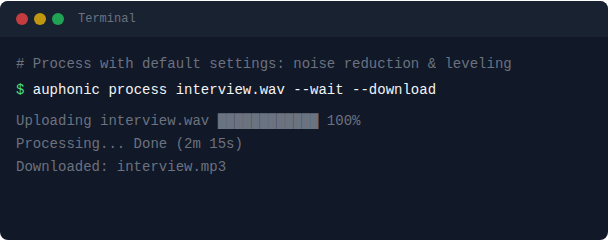
Processing a file is as simple as a single command. The CLI uploads your audio to Auphonic, applies our default audio algorithms automatically, and downloads the processed result back to your machine:
Presets save your production settings — output formats, loudness targets, metadata, publishing destinations — so you get consistent results across episodes without repeating yourself. The --preset flag accepts either the preset name or its UUID. You can also pipe audio from other tools like ffmpeg:
Need to check on past productions or grab a result file? The list and download commands let you quickly browse your production history and pull output files. Add --open to open the production in your browser, or use auphonic open UUID to jump to any production at any time:
Multitrack productions let you process separate audio tracks for each speaker or source — Auphonic automatically balances levels, reduces crosstalk, and mixes them into a final file. This is ideal for interviews, panel discussions, or any recording with multiple microphones:
You can add Speech Recognition to generate transcripts alongside your processed audio, publish directly to an External Service like your podcast host or YouTube, or set default options so you don't have to repeat them every time:
See the CLI reference documentation for the full command reference.
Auphonic API Updates
Alongside the CLI, we've made some improvements to the Auphonic API that benefit both API users and CLI users alike.
OpenAPI specification: The Auphonic API now has a full OpenAPI 3.0.3 specification covering all endpoints. In practice, this means you can auto-generate client libraries in your language of choice, get autocompletion in your IDE, and validate requests before sending them. You can also browse the full API interactively via ReDoc.
Preset names in API: You can now reference presets by name instead of UUID in API calls — no more copying opaque identifiers. The CLI uses this feature under the hood, which is why --preset "My Podcast" works out of the box. If multiple presets share a name, priority goes to personal presets first, then shared, then default. See the API documentation for details.
Get Started
The CLI runs on macOS, Linux, and Windows. Install it with a single command:
You can also download pre-built binaries directly from
auphonic.com/cli,
where you'll find setup instructions for all platforms.
For the full command reference, see the
CLI documentation.
Feedback
The CLI is a new addition to Auphonic, and we'd love to hear how it works for you. If you have feedback, run into issues, or have ideas for new features, please visit our Contact Page or email us at support@auphonic.com.