Auphonic's Automatic Cutting now works with video files. You can automatically remove silence, filler words, coughs, and music segments directly from video podcasts, interviews, webinars, lectures, and broadcast recordings – without a separate video editor. You can also use the Auphonic Editor to manually cut your video, just like in a traditional video editor.
1080p video cutting is included in the free plan. 4K video cutting is available on all paid plans. Video cutting works in the web interface, the Auphonic API, and the Auphonic CLI.

What You Can Cut from Videos
Auphonic offers four automatic cutting types, plus fully manual Custom Cuts. All of them now work with both audio and video files:
- Cut Silence – detects and removes dead air, long pauses, and silence at the start or end of recordings. Uses voice activity detection to preserve natural speech breaks.
- Cut Filler Words – detects and removes "uhm", "uh", "mh" and equivalent sounds.
- Cut Coughs – detects and removes coughing, throat-clearing, and sneezing. Best combined with Remove Breaths for clean results.
- Cut Music – detects and removes foreground music segments (songs, interludes) longer than approximately 20 seconds. Useful for broadcast archives where music licensing restricts on-demand availability.
- Custom Cuts – manually select and cut any region in the Auphonic Editor using the [Add Cut] button. Use this for full manual video editing or to complement the automatic cutting types above.
You can enable any combination in a single production. Crossfades are applied at cut boundaries automatically.
 The Automatic Cutting section in your production settings
How Video Cutting Works
Upload a video file (supported formats include MP4, MOV, MKV, AVI, WEBM, and many more), enable the cutting types you need, and add a Video Output. Auphonic analyzes the audio track, detects the segments to cut, and removes the corresponding audio and video in sync.
Three cut modes are available:
- Apply Cuts – removes the detected segments from the video file
- Set Cuts To Silence – fades audio to silence in the marked regions while keeping the video intact
- Export Uncut Audio – keeps the original recording untouched and generates cut lists you can import into DaVinci Resolve (EDL), Final Cut Pro (FCPXML), Reaper (EDL), Audacity, or Adobe Audition
Review and Adjust Cuts in the Auphonic Editor
After processing, the Auphonic Editor shows a synchronized video track alongside the audio waveform, so you can verify each cut visually and by ear. Cut types are color-coded (silence, filler words, coughs, music each have a distinct color).
You can activate or deactivate individual cuts, drag cut boundaries to adjust them, and add your own custom cuts with the [C] hotkey. When you click Apply Changes, Auphonic reprocesses the production at no additional credit cost.
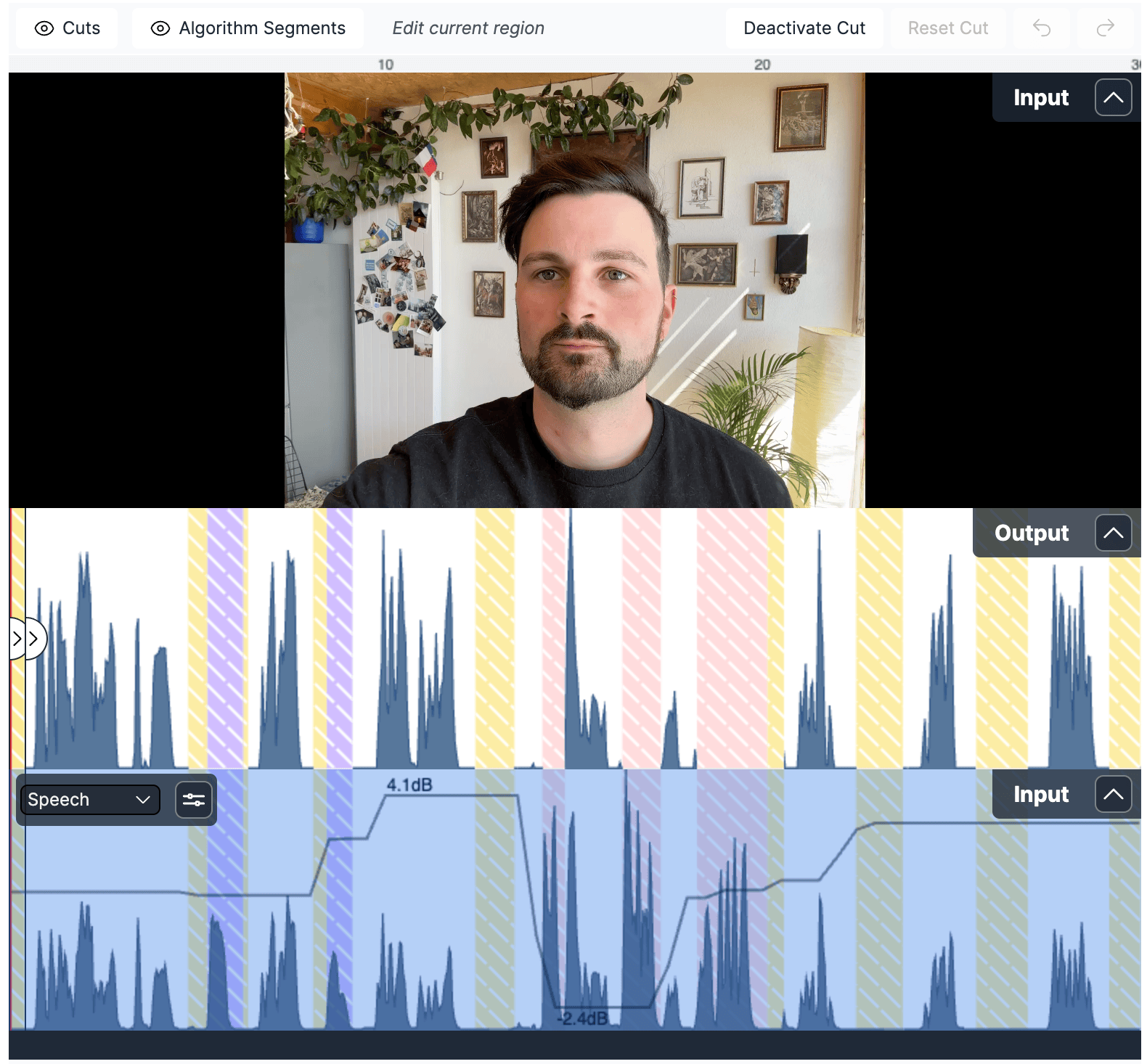 Reviewing automatic cuts in the Auphonic Editor with synchronized video playback
Video Cutting via API and CLI
Video cutting is fully supported in the Auphonic API and the Auphonic CLI, so you can integrate it into automated production pipelines or batch-process multiple recordings.
With the CLI, cut a video file in a single command:
auphonic process --silence-cutter --filler-cutter --cough-cutter -o video:mp4 recording.mp4
With the API, set the algorithm parameters in your production request:
{
  "algorithms": {
    "silence_cutter": true,
    "filler_cutter": true,
    "cough_cutter": true,
    "music_cutter": true,
    "cut_mode": "apply_cuts"
  },
  "output_files": [
    {
      "format": "video",
      "ending": "mp4"
    }
  ]
}
Both support cut list exports, configurable fade times, and manual cuts.
Conclusion
- Auphonic automatically removes silence, filler words, coughs, and music from video files
- 1080p video cutting is free; 4K is available on all paid plans
- Review and refine cuts in the Auphonic Editor with synchronized video playback
- Export cut lists for DaVinci Resolve, Final Cut Pro, Reaper, Audacity, and Adobe Audition
- Fully supported in the API and CLI for automated workflows
Feedback
We're continuously improving Auphonic based on real production workflows. If you have feedback, questions, or ideas, please reach out via our Contact Page, email support@auphonic.com, or send feedback from the results page.