Say hello to Studio Voice, our new most powerful voice enhancement model!
Instead of just filtering your audio, Studio Voice reconstructs a clear, studio-quality voice
from your recording. It removes codec and compression artifacts, repairs
distorted or clipped voices, recovers missing high frequencies, and even fixes
artifacts introduced by other denoising tools, text-to-speech systems,
or voice-processing pipelines.
Listen to the audio examples below to hear the difference for yourself!
Comparison to Our Voice AutoEQ
Studio Voice is part of the “Filtering” section in our production form, next to the Voice AutoEQ. So why does it get a completely different name?
Both are AI models that re-generate your voice — but they aim at very different goals.
The Voice AutoEQ focuses on the spectral balance: it works like an intelligent,
automatic equalizer, removing sibilance, boominess, or dullness so your voice sounds well-balanced.
Studio Voice goes far beyond that: it re-generates much more of the voice and fixes
problems that go beyond filtering and EQ — rebuilding a clear, studio-quality voice from
scratch. This lets it repair a much wider range of issues — some of which we already
tackled before, mainly within our
denoising models,
but not nearly as well as Studio Voice does:
- Codec and compression artifacts from low-bitrate recordings, video calls, or messenger voice notes
- Distorted or clipped voices, e.g. from overdriven microphones
- Missing high frequencies: Studio Voice performs bandwidth extension and restores the full spectrum
- Artifacts from other processing tools, like denoising algorithms, text-to-speech systems, or other voice-processing pipelines
Better Denoising, Dereverberation, and Bandwidth Extension
Studio Voice also improves our
Noise Reduction
results:
In case of extreme background noise or strong reverb, every denoising algorithm
— including our own — has to make hard decisions and might slightly
distort the voice while removing the noise, sometimes leaving it sounding
a bit robotic.
Studio Voice runs after the denoiser and restores the damaged voice in exactly
those cases, so you can combine aggressive noise or reverb removal with a natural,
clear-sounding result.
And because Studio Voice includes bandwidth extension as well, it is also a successor to our Bandwidth Extension (BWE) model: it recovers missing high frequencies even better and might replace the current BWE model in the future.
Audio Examples
It’s hard to read audio, but easy to hear the difference. Here are some comparisons with and without Studio Voice — please use headphones to hear all details!
Flight Radio Communication
This is a real radio communication recording from flight training. Like most radio transmissions, it has a reduced bandwidth, plenty of background noise, and simply sounds quite bad. With our denoiser and Studio Voice, the voice becomes clear and natural again, with the full frequency range restored:
| Original: | |
| Denoised + Studio Voice: |
A Deliberately Ruined Recording
To demonstrate what Studio Voice can do, we took a clean recording and deliberately ruined it: we added noise and distortion and removed the high frequencies. Studio Voice rebuilds a clear, studio-quality voice from this heavily damaged input:
| Original: | |
| Denoised + Studio Voice: |
How to Use Studio Voice
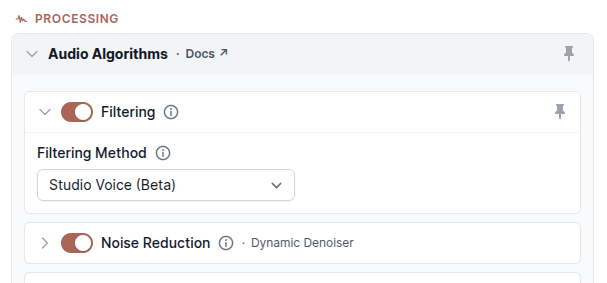
Using Studio Voice is easy: create a production, and in the “Filtering” section of the production form, select “Studio Voice (Beta)” as “Filtering Method”:
You can also activate Studio Voice via our
API
with the parameter filtermethod=studiovoice, or with the
Auphonic CLI:
auphonic process input.wav --filter-method studiovoice
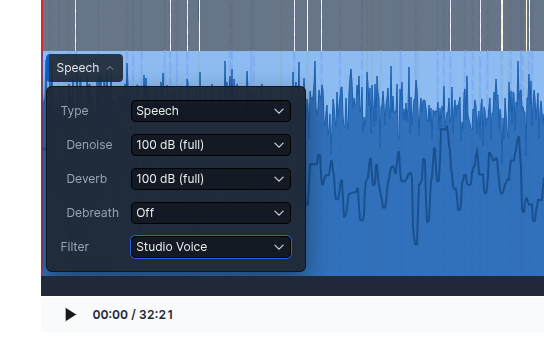
You don't have to apply Studio Voice to your whole file: you can also enable it only in specific sections of your audio. Just select the region in our Audio Editor and set the Filter for that section — perfect for fixing a few damaged passages while leaving the rest untouched. The same per-section settings are also available via the API.
Tip: If the result sounds too clean for your taste, use the Remove Noise and Remove Reverb amounts in the Noise Reduction section to mix back some of the original atmosphere. A little bit of natural room and ambience often sounds better than a totally clean studio voice!
Why Is It Still Beta?
We call Studio Voice a beta feature for a few reasons:
- We are still working on the model and the algorithm — expect further quality improvements.
- We might rename or move the feature later: as Studio Voice also improves denoising and dereverberation results, it does not really fit into the section “Filtering” anymore.
- As with every new AI model, problems might still appear in some recordings, which we will fix during the beta phase.
Feedback
Everyone is invited to try out Studio Voice!
Process your most difficult recordings and let us know how it works for you —
especially if you run into any problems, so that we can fix them.
Send us your thoughts through the production feedback form, our
Contact Page,
or directly at support@auphonic.com.
Your feedback during the beta phase directly shapes the final version of Studio Voice!